ESE File Types
The files types associated with a CygNet ESE-based datastore are listed in the table below. ESE-specific file names may vary by operating system.
| Directory | File Extension * | Description |
|---|---|---|
|
data |
.cfg |
The service configuration file, for example, <ServiceName>.cfg. |
|
.dat.edb |
The data file containing the data. Note the dot dot extension, for example, <ServiceName>.dat.edb. |
|
|
.dat.pat |
The patch file for the .dat.edb file. This file keeps track of updated pages while the backup is running to make sure that pages that are modified during the backup are also backed up, for example, <ServiceName>.dat.pat. |
|
|
.ddl |
The service database schema file, for example, <ServiceName>.ddl. |
|
|
.exe |
The service executable file, for example, <ServiceName>.exe. |
|
|
.inx.edb |
The index file containing indexes. Note the dot dot extension, for example, <ServiceName>.inx.edb. |
|
|
.inx.pat |
The patch file for the .inx.edb file. This file keeps track of updated pages while the backup is running to make sure that pages that are modified during the backup are also backed up, for example, <ServiceName>.inx.pat. |
|
|
.replnotify |
The service replication notification file, which stores replication information, for example, <ServiceName>.replnotify. |
|
|
.ts.edb |
The temporary storage file containing temporary storage data. Note the dot dot extension, for example, <ServiceName>.ts.edb. |
|
|
.ts.pat |
The patch file for the .ts.edb file. This file keeps track of updated pages while the backup is running to make sure that pages that are modified during the backup are also backed up, for example, <ServiceName>.ts.pat. |
|
| .log |
The service logging file containing service logging data. Note: Transaction log files may use the same extension but serve a very different purpose. See the note below for edb.jtx. |
|
|
metadata.dat |
The metadata file containing service meta data information. Only AUD, ELS, ELSALM, FAC, and GRP services. |
|
|
edb.jcp |
The checkpoint file. See Checkpoint File below. |
|
|
edb.jtx |
The transaction log file containing the operations on the database files. The file named edb.jtx is the current transaction log file. When this file is full, the file is sequentially renamed (edb####.jtx) and the service creates a new edb.jtx file. See Transaction Logging. Note: On an upgraded system these files may use the file name and extension “edb.log”. Note that the service log files have the same extension but serve a very different purpose. Take care deleting “*.log” files if your services use edb.log for their transaction log file names. |
|
|
edbres####.jrs |
The reserved file, a special type of transaction log file. See Reserved Files below. |
|
|
edbtmp.jtx |
The temporary transaction log file. See Temporary Transaction Log File below. |
* The files in the data directory for each file type are prefaced by the service name, for example, Dds.cfg, Fac.dat.edb, Mss.inx.pat, etc. The file in the txlogs directory are not, for example, Services\DDS\txlogs\edb.jtx.
Checkpoint File
ESE uses a checkpoint file (edb.jcp) for efficient data recovery. This file tracks how far ESE has progressed in writing the logged information to the database.
The checkpoint marks the exact point in time in the transaction log file where all information before the checkpoint has been written to the database file. It is unknown if the information after the checkpoint (the inactive portion) has been written to the database or not. Since all information in the transaction log files prior to the checkpoint is in the database file, only the transaction log files after the checkpoint are needed for soft recovery to bring a particular database into a clean state.
If the checkpoint file is destroyed, then the ESE recovery begins with the oldest log file available. It scans through the log file and skips data that has already been applied.
Transaction Logs and Crash Recovery
The primary purpose of transaction log files is for crash recovery. The files contain enough information to bring a database to a logically consistent state after an unexpected process termination or system shutdown (if the database is undamaged).
When a service does have multiple log files, it is impossible to say which of the transaction log files contain the data necessary to recover the database if a failure occurs (or, conversely, which files do not contain the required data). This is due to the method in which the files are written to and renamed. Data recovery is one reason why log files should never be manipulated, renamed, moved, or deleted. Any manipulation of transaction log files can result in data corruption.
If you absolutely need to delete a transaction log file you can do so safely after a complete database backup has been performed and the service has been cleanly shutdown.
Verify Clean Shutdown
To verify that ESE has identified the shutdown as clean, use the ESENTUTL utility to dump the database header information to the screen. See File Dump for instructions on using the ESENTUTL utility.
If the shutdown was clean, then State and Log Required will display:
State: Clean Shutdown
Log Required: 0-0 (0x0-0x0)
to indicate that the DBS-based service has been shutdown cleanly and no log files are required for crash recovery.
Crash Recovery
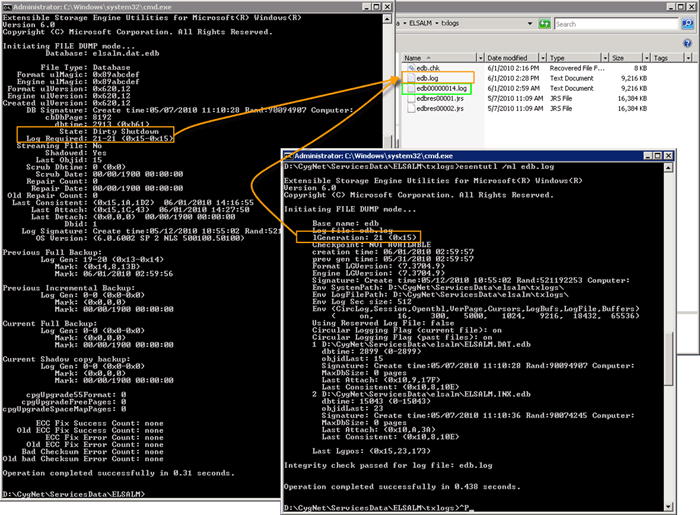
In the following example, a file dump has been performed on the current log file (edb.log) and the State is Dirty Shutdown and the Log Required indicates the log files required for recovery. 21-21 (0x15-0x15) means log file 21 (decimal) is required for recovery.
|
Crash Recovery |
Reserved Files
Reserved files are a special type of transaction log file. The purpose of these files is to reserve disk space. During engine initialization, ESE creates reserved transaction log files to allow important operations to be logged to get a clean shutdown.
In a situation where the database engine is starting in an "out-of-disk" space condition, ESE cannot create a new transaction log file. The safest thing to do is to detach the database and shut down. However, to execute this operation cleanly, ESE may require additional disk space (for example, to write rollback for current operations).
The reserved transaction log files are used in this situation. Because the reserved transaction log files are created in anticipation of need for transaction log files in an out-of-disk scenario, they do not contain any useful information.
Temporary Transaction Log File
When the edb.jtx fills up, ESE needs to create a new file, called edbtmp.jtx. The new log transaction file is known as a temporary transaction log file prior to its use by ESE. Because the temporary transaction log file is created in anticipation of need for a new transaction log file, it does not contain any useful information.


